
Your salon experience, in your pocket.
Choose a service and request a time. Follow the salon's confirmation, your visits and your points in one place.
The customer app currently opens in Turkish. This guide explains each step in English.
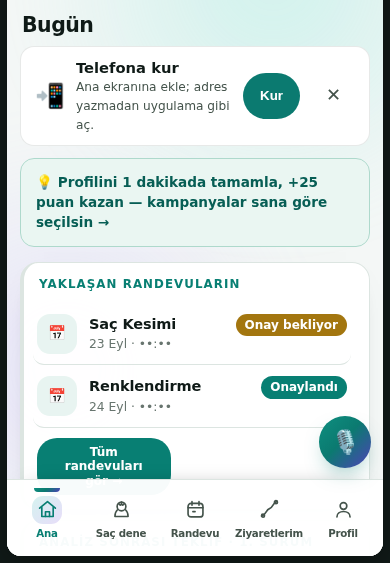
Eight steps, from sign-up to daily use.
Explore the benefits in order. You can open the customer app whenever you are ready.
Create your account
Enter your phone number and email, then verify your email. Your account keeps appointments and points together.
Your personal information stays in your own customer view.
Create your account
Enter your phone number and email, then verify your email. Your account keeps appointments and points together.
Choose a time that suits you
Select a service, day and available time. Your request reaches the salon for confirmation.
The appointment is pending until the salon confirms it.
Choose a time that suits you
Select a service, day and available time. Your request reaches the salon for confirmation.
Stay on top of your plans
With your permission, receive appointment confirmations and reminders on your phone.
Notifications depend on your device and permission settings.
Stay on top of your plans
With your permission, receive appointment confirmations and reminders on your phone.
See your history in one place
Review your past visits, appointments and points in the Visits section.
Point rules and thresholds depend on the current salon campaign.
See your history in one place
Review your past visits, appointments and points in the Visits section.
See offers assigned to you
The salon may assign benefits to customers using the app. Check what is available to your account.
Personalized marketing messages require your consent; core booking still works without it.
See offers assigned to you
The salon may assign benefits to customers using the app. Check what is available to your account.
Make your visit more comfortable
Let the team know when you arrive and view available refreshment options.
Options depend on that day's salon catalogue and stock.
Make your visit more comfortable
Let the team know when you arrive and view available refreshment options.
Spin when you earn a turn
If your points reach the salon's threshold, a wheel turn may appear in your account.
Turns and prizes depend on active campaign rules; a prize is never guaranteed.
Spin when you earn a turn
If your points reach the salon's threshold, a wheel turn may appear in your account.
Keep SalonOS on your home screen
Open the customer app from your phone's home screen like an installed app.
On iPhone use Safari → Share → Add to Home Screen. On Android use Chrome → menu → Install app.
Keep SalonOS on your home screen
Open the customer app from your phone's home screen like an installed app.
Ready to plan your next visit?
Create your account, request a time and follow the salon's reply.